

シンワ測定
Shinwa Measuring Instruments Laser Distance Meter L-MeasureBK50 Green with Data Transfer Function 78173
Shinwa Measuring Instruments Laser Distance Meter L-MeasureBK50 Green with Data Transfer Function 78173
SKU:78173
Low stock
Couldn't load pickup availability
We will issue a receipt.
We will issue a receipt.
Compatible with invoice system
If you wish to have it issued, please enter the addressee in the notes section on the cart screen before placing your order.
Customers who order by cash on delivery
Regarding receipts, we will use the cash-on-delivery receipt issued by the shipping company attached to the invoice in place of the receipt.
About shipping and delivery
About shipping and delivery
Shipping fee (tax included)
Standard shipping: 800 yen nationwide (1,200 yen to Hokkaido and Okinawa) *Excluding large items
Nekopos: 350 yen nationwide (limited to eligible products)
*We will cover shipping costs for purchases totaling 10,000 yen or more (tax included).
For large items, the product price is Shipping charges will still apply even if the total amount exceeds 10,000 yen (tax included).
Hokkaido, Honshu, Shikoku, Kyushu: Shipping fee: 3,800 yen (tax included)
Okinawa: Shipping fee: 8,000 yen (tax included)
Delivery company
Yamato Transport, Sagawa Express, Japan Post
*Orders in the "Courier" category will be shipped via Yamato Transport or Sagawa Express, and orders in the "Nekopos" category will be shipped via We will ship by Nekopos.
*Items in stock will be shipped within 1-3 business days of receiving your order ( excluding New Year's and Golden Week holidays).
*Shipping is from 9am to 3pm on weekdays, excluding Saturdays, Sundays, and holidays.
Number of days from shipping to delivery
Standard delivery: 2-4 days
Nekopos: 3 days to 1 week *If the delivery address is far away or on a remote island, it may take longer.
* Regarding pre-order items
If you purchase a pre-order item and a regular item in the same cart, the items will be shipped as soon as all items are available, so they will be shipped according to the item with the latest shipping date.
Please be aware of this.
About payment method
About payment method
Payment Method
At Kanazuya Shoten, you can choose from the following payment methods.
- Credit card
- Apple Pay
- Google Pay
- Shop Pay
- Merpay
- PayPay
- Pay later (Payday) (convenience store, direct debit, bank transfer)
- au Easy Payment (auPAY)
- Rakuten Pay
- d Pay
- Cash on delivery
Credit card
VISA, MASTER, JCB, AMEX
About Shop Pay
This is a payment service provided by the online shopping system "Shopify." If you register your email address and mobile phone number with Shop Pay, you can easily make payments the next time you make a purchase by simply entering a 6-digit Shop Pay code (SMS authentication) sent to your email address and mobile phone number, without having to enter your shipping address or credit card information again.
*For details about the service, please visit the Shop Pay official website .
Apple Pay
This service allows you to pay in stores and online by registering your credit card or electronic money on your Apple device.
Google Pay
Google Pay is a fast and easy payment service from Google that can be used on Android devices.
About Pay Later (Payday)
- No prior registration or credit card registration required.
- Purchase now with just your email address and mobile phone number.
- Payment must be made by the 27th of the following month via convenience store payment, bank transfer, or direct debit.
- No matter how many times you purchase in a month, you can pay in one lump sum the following month.
[How to use]
① Select "Pay Later" as your payment method and enter your email address and mobile phone number.
② Enter the 4-digit authentication code sent via SMS to complete the purchase.
③ You will receive an email or SMS informing you of the billing amount between the 1st and 5th of the following month.
④ Please pay by the 27th of the following month via convenience store payment, bank transfer, or direct debit.
*If you use direct debit, please register your bank account via the MyPaidy app or the web version of MyPaidy after completing your purchase.
[Regarding fees]
Direct debit: Free Bank transfer: Transfer fees vary depending on the financial institution Convenience store payment: Up to 390 yen (tax included)
[About identity verification]
By verifying your identity through the Payday app, you can take advantage of convenient features such as the ability to pay in three installments with no fees*, checking your available balance, and setting budgets to prevent overspending.
[Download the Paidy app here]
App Store: https://apps.apple.com/jp/app/paidy/id1220373112
Google Play Store: https://play.google.com/store/apps/details?id=com.paidy.paidy
*Only direct debit and bank transfers are free of charge
**Only available for purchases of 3,000 yen or more per transaction
[Payment]
・Invoices will be issued on the 1st of each month with finalized billing at the end of the month, and will be sent by email or SMS (short message) by the 5th of the month.
・Payment methods are convenience store payment (using a terminal installed at a convenience store), bank transfer, and direct debit.
・The payment deadline is the 27th for convenience store payments and bank transfers. For direct debit payments, the payment will be debited on the 27th*.
・A fee will be charged for each monthly payment (invoice) depending on the payment method. For convenience store payments, the fee is up to 390 yen (tax included), and for bank transfers, the customer will be responsible for the transfer fee. For direct debit payments, there is no payment fee.
au Easy Payment (auPAY)
au Easy Payment is a payment service that allows you to pay for digital content and shopping purchased on your smartphone, PC, etc.
Payment methods include combined payment of communication charges, au PAY card payment, au PAY balance payment, WebMoney or credit card payment.
Cancellation and change of order
Please contact us here .
Regarding refusal of delivery when paying by cash on delivery
If the recipient of a product shipped via cash on delivery is unable to receive it, is absent for a long period of time, or refuses to accept it, the product will be returned to us.
In this case, regular return shipping fees (cash on delivery) will be charged for each item, and we will incur losses such as the cost of packaging materials and time spent on return procedures, in addition to the round-trip shipping fees.
Therefore, if the product is returned to us due to reasons such as refusal (rejection) of the COD payment without a valid reason or expiration of the storage period, we will charge you the round-trip shipping fee, COD handling fee, packaging materials and return handling fee, and we will not accept any future orders from you.
*Even if a product is marked as free shipping, we will cover the shipping costs, so we will charge you the actual shipping costs.
*This also applies if the product cannot be delivered due to reasons such as an unknown address.
*When placing an order, please be sure to check your address number, room number, etc. before registering your address.
Preventing fraudulent use of credit cards
Please note that we may take the following measures to prevent fraudulent use of credit cards.
- If the "orderer's name" and "card holder's name" are different, we may ask you to verify your identity (by email or phone).
- In addition, if the order is not in your name and we are unable to contact you within a certain period of time, we may cancel the order.
- To prevent fraudulent use by third parties, we check the fraud prevention system and verify the card through the card company.
- If fraudulent use is discovered, we will submit order data and other information to the police, file a complaint, and register information about the fraudulent use in a shared database.
- If you register false information or information about another person as your personal information, or if there is any other fraudulent use, we will suspend the use of that account ID.
About the color of the posted product
About the color of the posted product
We strive to make the colors of the products you see look as close as possible to the actual product, but due to differences in your environment (monitor, browser, etc.), the color may differ slightly from the actual product. Thank you. Please note.
- Highly visible green laser.
- Equipped with Bluetooth® communication function, measurement values can be sent to smartphones, tablets, and computers.
- Built-in Bluetooth® eliminates the need for a dedicated receiver or transmitter.
- The LCD has white text on a black background, making it easy to read even in bright places.
- Time difference measurement prevents camera shake that occurs when pressing a button.
- Dustproof and waterproof performance: Designed to be resistant to water and dust with protection rating IP54.
- It is possible to display units equivalent to shaku, which is convenient on construction sites.
specification
| Body size | 122.00×47.00×26.00mm |
| Product mass | 120.00 g (including battery) |
| power supply | Two AAA alkaline batteries *The included battery is for monitoring purposes and may have a short lifespan. * When using new batteries, approximately 4,000 measurements can be made (when using alkaline batteries). |
| Measurement range | 0.3 to 50 m |
| accuracy | ±0.2mm * 0.3 to 10m: ±2.0mm * 10m or more: ±[2.0+0.05×(D-10)]mm (D = measurement distance, unit: m) [Measurement conditions] ① Illuminance 3,000 lux or less ② White target with 90% reflectance ③ Measurement temperature 25℃ |
| output | 1mW or less (Class 2 JIS C6802:2018) |
| wavelength | 480-550nm |
| Operating temperature | 0 to 40°C |
| storage temperature | -20 to 70°C |
| Bluetooth® | 4.2 ① Data is only transferred during normal distance measurement. Continuous distance measurement is not supported. ②Only measured values can be transferred. *The Bluetooth® word mark and logos are owned by Bluetooth SIG, Inc., and Shinwa Measurement Co., Ltd. uses these trademarks under license. |
| Communication distance | 7m |
| Auto Power Off | After approximately 3 minutes of inactivity* A beep will sound when the auto power-off occurs. The laser light will also turn off after approximately 30 seconds of inactivity. |
| Dustproof/waterproof performance | IP54 * Prevents dust from entering the interior. Even if a small amount of dust gets in, it will not hinder normal operation. * Not adversely affected by water splashes from any direction. |
| Material | ABS resin, acrylic resin, elastomer resin |
| accessories | Two AAA alkaline batteries for strap monitor |
 Shinwa measurement data management app
▼Please access each app store from the links below and download
*Supported OS: iOS 12.4 and later / Android 7.1.1 and later
▼Click here for the app instruction manual
[App Features]
- The measured data can be saved in the app and viewed and managed.
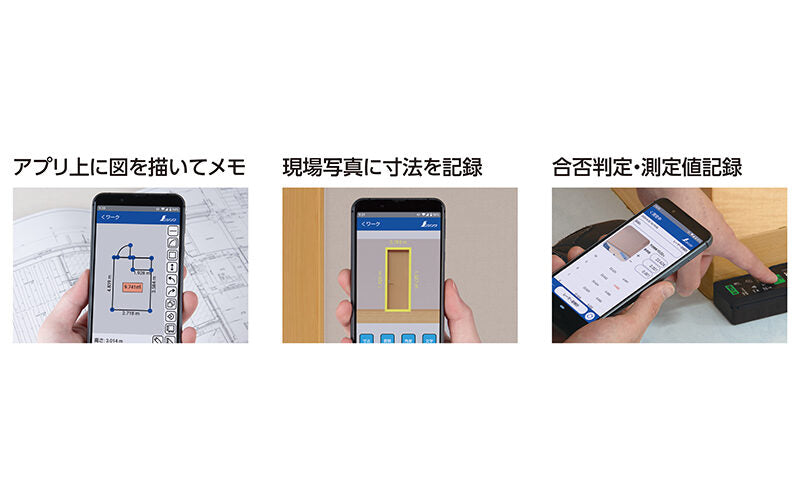
- It is possible to judge whether the object being measured is pass or fail.
- The laser distance meter can be used in floor plan mode and photo mode. In floor plan mode, you can draw diagrams and make notes, and in photo mode, you can input dimensions into site photos and record them.
- The measurement values are read out loud.
- Measured data can be exported in CSV or PDF format.
How to connect and use Bluetooth® between your computer and measuring device
※Please read first:
A measuring device connected to a computer is recognized as an "input device" like a keyboard.
When connected to a computer, the measured values can be entered into the computer's notepad software, Excel, etc.
■Connection method
1. Turn on the Bluetooth connection on your computer and detect the Bluetooth on your device. (For Windows 10: Settings → Bluetooth and other devices → Add Bluetooth or other device → Select Bluetooth)
②Clear all measurements displayed on the laser rangefinder screen.
3. Press and hold the "Memory Pairing Button" on the laser rangefinder to put the laser rangefinder's Bluetooth into communication mode. (For more information about the "Memory Pairing Button," please refer to the product's instruction manual.)
④It will be detected as a "Bluetooth Keyboard" on your computer, so simply select it and connect.
■ How to use (Enter the measured data into software such as Notepad on your computer)
1. On your computer, open software that allows you to input text (for Windows: Notepad, Excel, etc.) and bring up the cursor for entering text.
②Measure using a laser rangefinder paired with a computer.
③Press the "ON/Measurement button" on the laser rangefinder and the measurement value will be entered as text.
*Only numerical values will be entered. Units such as "meters" and "equivalent to shaku" will not be entered.
■Conditions for canceling pairing
- When the pairing is canceled from the measuring device
- When the battery of the paired measuring device is removed
- When the power is turned off
- When the power is turned off by auto power off *If you want to pair again, please perform the pairing settings again.
 View full details